> ## Documentation Index
> Fetch the complete documentation index at: https://docs.yumiproxy.com/llms.txt
> Use this file to discover all available pages before exploring further.
# AdsPower
**Before configuration, please obtain an IP from YumiProxy first and ensure the proxy settings are correct to guarantee normal operation.**
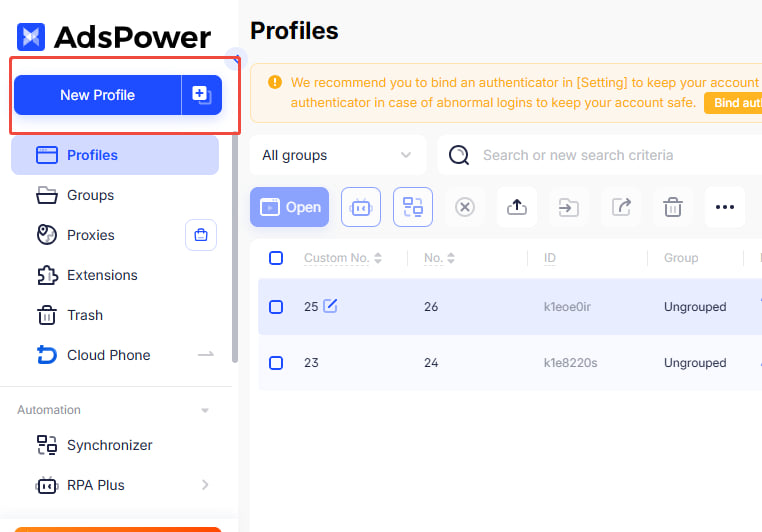
1. Go to the AdsPower interface and click **New Browser** on the left.
 2. Scroll down to the proxy configuration section, select **Custom**, and enter the generated link in the format `Host:Port`. Then fill in the proxy account and password accordingly.
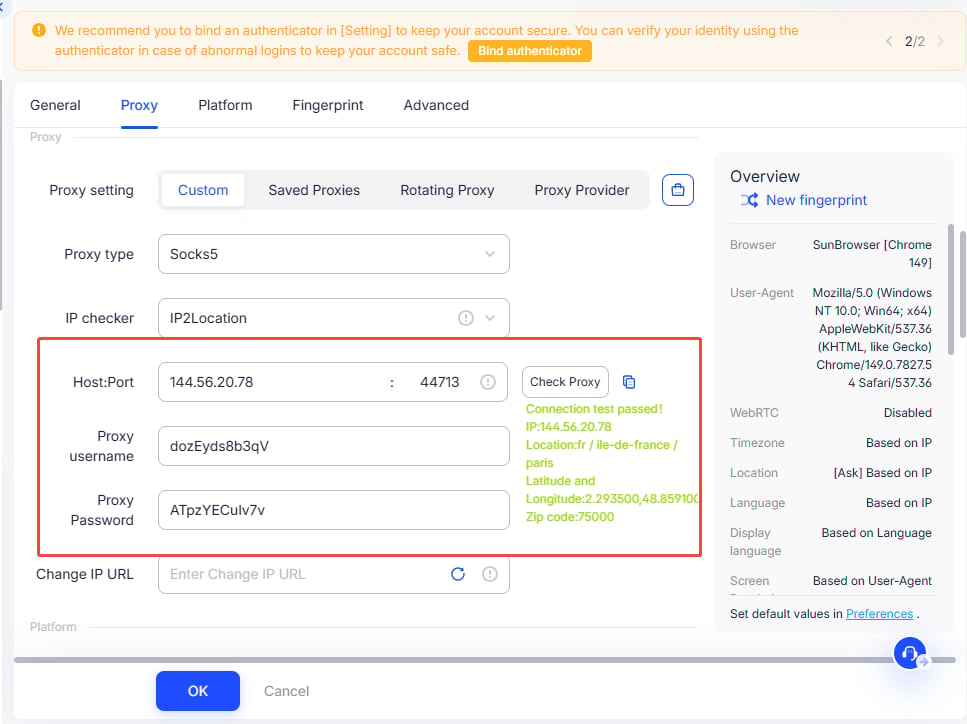 3. Click **Check Proxy** to test whether the connection is successful. After that, click **OK**. If successful, it will directly jump to the **Environment Management** interface, where you can open and use it.
After completing the above steps, you can now use YumiProxy's proxy to access web pages in AdsPower.
If you have any questions or suggestions during use, please feel free to contact us. We are happy to hear your ideas and provide assistance.
3. Click **Check Proxy** to test whether the connection is successful. After that, click **OK**. If successful, it will directly jump to the **Environment Management** interface, where you can open and use it.
After completing the above steps, you can now use YumiProxy's proxy to access web pages in AdsPower.
If you have any questions or suggestions during use, please feel free to contact us. We are happy to hear your ideas and provide assistance.